1、首先要确认操作系统的版本和位数
[root@localhost ~]# cat /etc/redhat-release
CentOS Linux release 7.2.1511 (Core)
[root@localhost ~]# uname -a
Linux localhost.localdomain 3.10.0-327.el7.x86_64 #1 SMP Thu Nov 19 22:10:57 UTC 2015 x86_64 x86_64 x86_64 GNU/Linux
[root@localhost ~]#

2、确认了是centos7的系统,要确认下是否已经安装了iptables.service
使用 rpm -qa|grep iptables命令进行验证
[root@localhost ~]# rpm -qa|grep iptables
iptables-1.4.21-16.el7.x86_64
结果只有一个,表面iptables.service 没有安装

3、使用yum install iptables-services命令秤棍安装防火墙,输入y继续
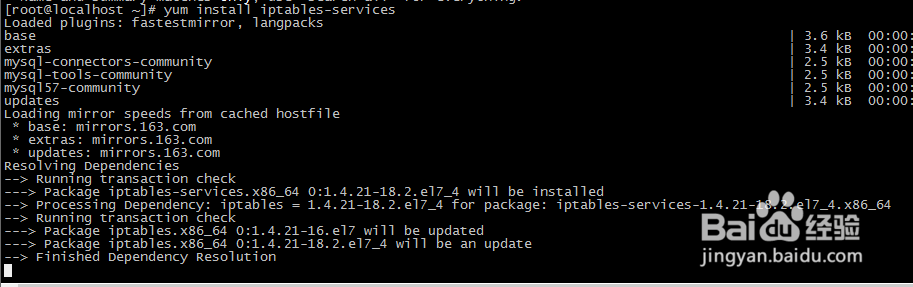
4、用rpm -qa|grep iptables命令进行验证
[root@localhost ~]# rpm -qa|grep iptables
iptables-1.4.21-18.2.el7_4.x86_64
iptables-services-1.4.21-18.2.el7_4.x86_64
只有两者同时有了才表明安装成功

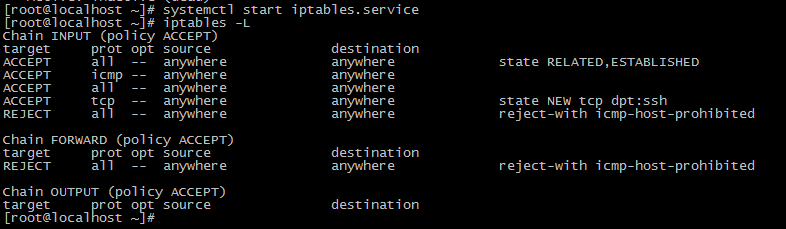
5、启动醒关iptables.service,并查看规则
[root@localhost ~]# systemctl start iptables.service
[root@localhost ~]# iptables -L
Chain INPUT (policy ACCEPT)
target prot opt source destination
ACCEPT all -- anywhere anywhere state RELATED,ESTABLISHED
ACCEPT icmp -- anywhere anywhere
ACCEPT all -- anywhere anywhere
ACCEPT tcp -- anywhere anywhere state NEW tcp dpt:ssh
REJECT all -- anywhere anywhere reject-with icmp-host-prohibited
Chain FORWARD (policy ACCEPT)
target prot opt source 搁羞怕 destination
REJECT all -- anywhere anywhere reject-with icmp-host-prohibited
Chain OUTPUT (policy ACCEPT)
target prot opt source destination
[root@localhost ~]#
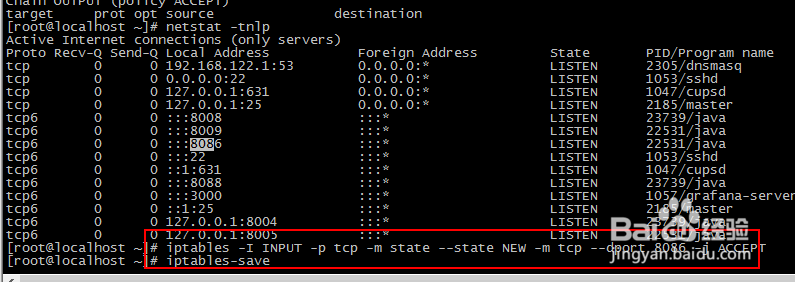
6、开启8086端口
iptables -I INPUT -p tcp -m state --state NEW -m tcp --dport 8086 -j ACCEPT
iptables-save