1、新建一个HTML文档,如图所示


2、定义页眉,页脚,侧边栏和内容,在body标签里输入
<div class="">
<div id="">页眉</div>
<div class="">侧边栏</div>
<div class="">主内容</div>
<div id="">页脚</div>
</div>
如图所示

3、然后定义他们的id和class,如图所示

4、然后在head标签里定义css文件,如图所示
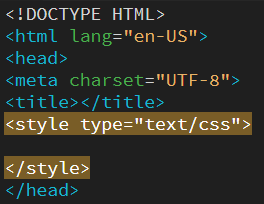
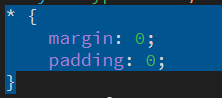
5、编写全体输入
* {
margin: 0;
padding: 0;
}
如图所示
6、编辑定位整体,输入
.wrapper {
width: 960px;
margin-left: auto;
margin-right: auto;
color: #fff;
font-size: 30px;
text-align: center;
}
如图所示

7、编写页眉,输入
#header {
height: 100px;
background: #38382e;
margin-bottom: 10px;
}

8、编写页脚。输入
#footer {
background: #cc4ad5;
height: 100px;
text-align: center;
clear: both;
}

9、编写侧边栏,输入
.sidebar {
float: left;
width: 220px;
margin-right: 20px;
margin-bottom: 10px;
height: 300px;
background: #5d33cf;
}

10、编写内容部分,输入
.content {
float: left;
width: 720px;
height: 300px;
background: #c8ca30;
margin-bottom: 10px;
}

11、最后按f12预览即可
