返回
一点知道
网站首页
美食营养
游戏数码
手工爱好
生活家居
健康养生
运动户外
职场理财
情感交际
母婴教育
生活知识
生活百科
知识问答
更多知识
把excel表格插入PPT的方法
时间:2026-04-22 04:47:31
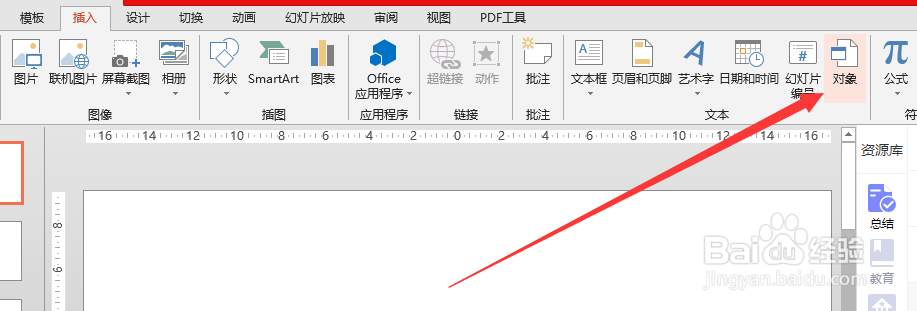
1、打开PPT,在“插入”菜单中找到并点击“对象”选项卡
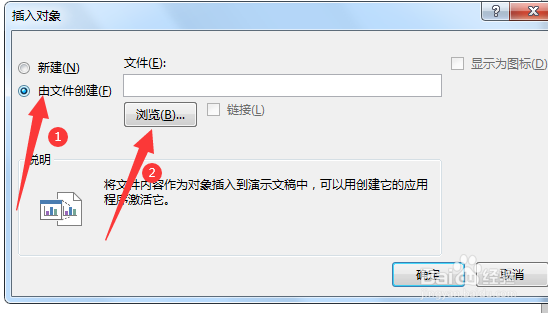
2、之后选择“由文件创建”,再点击“浏览”选择要插入的表,如图所示:
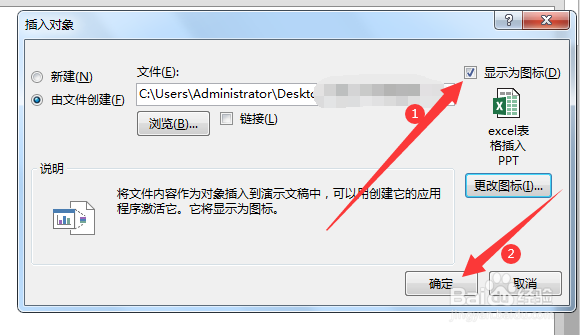
3、然后勾选“显示为图标”并点击“确定”即可,如图所示:
PPT中如何嵌入Excel文档?
怎么在ppt中插入excel表格
PPT怎样插入一个已经做好的excel表格
如何在ppt中加入一个excel文件
如何在ppt中加入一个excel文件
为你推荐:
狗狗冠状是什么症状
repost是什么意思中文
tomato是什么意思
什么是形容词
687是什么意思
盘符是什么
不负春光不负卿是什么意思
地瓜是什么
边际贡献是什么意思
区块链是什么意思
© 2026 一点知道
信息来自网络 所有数据仅供参考
有疑问请联系站长 site.kefu@gmail.com