1、点击“Notepad++”

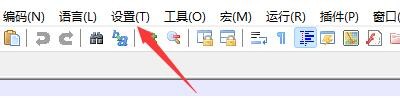
2、在“Notepad++”窗口中,点击“设置”
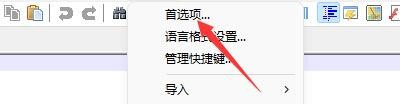
3、在弹出下拉栏中,点击“首选项”
4、在“首选项”窗口中,点击“新建”

5、在“新建”窗口中,找到“格式(行尾)”

6、在“格式(行尾)”栏目中,勾选“Windows(CRLF)”

7、点击“关闭”即可

1、点击“Notepad++”
2、在“Notepad++”窗口中,点击“设置”
3、在弹出下拉栏中,点击“首选项”
4、在“首选项”窗口中,点击“新建”
5、在“新建”窗口中,找到“格式(行尾)”
6、在“格式(行尾)”栏目中,勾选“Windows(CRLF)”
7、点击“关闭”即可