1、首先在电脑上打开eclipse,如图所示。

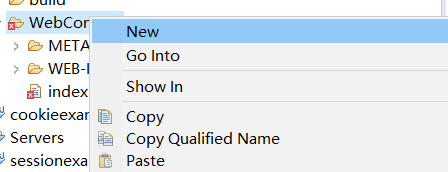
2、然后在Project Explorer项目中点击右键,并点击New选项,如图所示。
3、然后点击选项栏中Other选项,如图所示。

4、然后点击General文件夹选项,如图所示。

5、其次点击File选项,如图所示。

6、最后编辑File name并点击Finish即可。

1、首先在电脑上打开eclipse,如图所示。
2、然后在Project Explorer项目中点击右键,并点击New选项,如图所示。
3、然后点击选项栏中Other选项,如图所示。
4、然后点击General文件夹选项,如图所示。
5、其次点击File选项,如图所示。
6、最后编辑File name并点击Finish即可。